Dust Jacket Hardcover Book Mockup

What's inside
- Applications Photoshop
- File Types PSD
- License Free (see author's terms)
- Author Pixeden
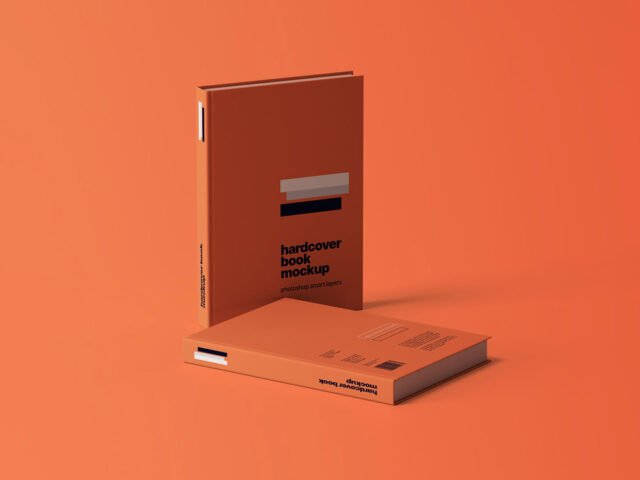
This dust jacket hardcover book mockup is a quick way to show a novel jacket without a photo shoot.
It’s a handy file for publishers and authors. One thing worth knowing: design the spine too, even if it’s narrow. Book mockups showing the side look unfinished with a blank spine.
Print jobs are expensive to redo, so a realistic preview before the order goes out is cheap insurance. If you’re building a full identity, pair it with an envelope or letterhead mockup for a matching set.
Credit goes to Pixeden. We link to their download page rather than re-uploading the file, so check their terms there before commercial use.
What’s inside the Dust Jacket Hardcover Book Mockup PSD
Main things you can change in Photoshop:
- Your design, placed through the smart object
- Paper or background colour
- Paper texture you can turn up or down
How to use the Dust Jacket Hardcover Book Mockup
- Set up the design flat at the real print size and keep text inside a safe margin.
- Open the PSD in Photoshop and find the smart object layer, usually named “Your Design” or “Place Here”.
- Paste your design, resize it to fill the area, then save (Ctrl/Cmd + S) and close that tab.
- Tweak the shadow and highlight layers to suit your colours.
- Export a full-size image for your portfolio and a smaller one for social media.
Worth remembering: keep text at least a few millimetres from the edge. The mockup shows the trim, and cramped margins read as a mistake.
Where the Dust Jacket Hardcover Book Mockup works best
- Use it as the cover image for a book cover in your portfolio.
- Make two or three colour versions of a novel jacket and let the client pick.
- Show an annual report cover on your online shop or product page.
Good to know
- Made by Pixeden. The download size and format are listed on their page.
- Check the licence on the author’s page. Personal and commercial terms differ from file to file.
- Built for Adobe Photoshop. A recent CC version handles the smart objects best.
- The preview shows the angle, background and lighting you’ll get.
Browse more free book mockups on Artistic Orbit, with new files added every day.
Questions about this mockup
What licence does it come with?
Pixeden sets the licence, and it can differ from file to file. Many free files allow personal and commercial use, but some are personal-only or ask for credit. Read the terms on the download page before a paid project.
How do I put my artwork on the book?
Find the smart object layer (it has a small icon on its thumbnail), double-click it, place your design, then save and close that tab.
Which Photoshop version do I need?
A recent Photoshop CC version is best. Older versions can open the file but sometimes have trouble with smart objects and effects.
Will my artwork look printed or pasted on?
Most print mockups keep the paper texture and lighting on separate layers above your design, so it takes on the grain and shadows. If it still looks too clean, lower the opacity of your artwork a little.