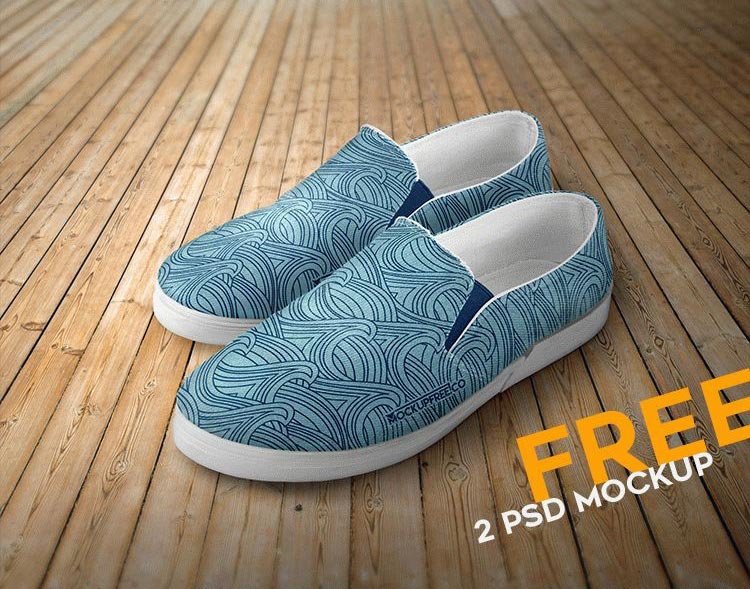
Slip on Shoes Mockup
What's inside
- Applications Photoshop
- File Types PSD
- License Free (see author's terms)
- Author MockupFree
This slip on shoes mockup is one of the simpler ways to present a small logo or a pattern convincingly.
It’s a handy file for merch brands and product designers. Quick tip: keep your artwork simple. Small objects shrink details quickly, so a bold mark reads better than fine lines.
It’s a nice extra slide in a branding presentation, after the logo and the main applications. Group it with other merch mockups for a branded items slide.
Use it for
- A small logo
- A pattern
- Merch branding
This is a free file from MockupFree. When you click download you’ll land on their page to grab it.
What you can edit in this Slip on Shoes Mockup
Everything below is on its own layer:
- Logo or artwork, placed through the smart object
- Object colour, where included
- Shadows
- Background colour
Add your design to the Slip on Shoes Mockup
- Prepare the artwork in your brand colours.
- Open the PSD in Photoshop and find the smart object layer, usually named “Your Design” or “Place Here”.
- Drop your artwork in, fit it to the canvas, save and close. The mockup updates by itself.
- Change the background colour at the bottom of the layer stack.
- Export a full-size image for your portfolio and a smaller one for social media.
Change the background colour to your brand palette; it does more for the final image than people expect.
Ways to use this Slip on Shoes Mockup
- Make two or three colour versions of a small logo and let the client pick.
- Use it as the cover image for merch branding in your portfolio.
- Show a pattern to a client before it goes to print or production.
Before you download
- Made by MockupFree. The download size and format are listed on their page.
- Check the smart object size before you design, so your artwork fits without stretching.
- Check the licence on the author’s page. Personal and commercial terms differ from file to file.
More free accessories mockups are listed below, each linking to the original author.
Questions about this mockup
Is it free for commercial use?
MockupFree sets the licence, and it can differ from file to file. Many free files allow personal and commercial use, but some are personal-only or ask for credit. Read the terms on the download page before a paid project.
How do I put my artwork on the accessory?
Find the smart object layer (it has a small icon on its thumbnail), double-click it, place your design, then save and close that tab.
Do I need Photoshop?
Yes. This is a PSD mockup built with smart objects, so you edit it in Adobe Photoshop. Any recent CC version works.
Can I change the background?
Most object mockups have a background colour or image layer at the bottom of the stack that you can swap.
Why does the download open another website?
We list free files from designers around the web and link to the original page, so MockupFree gets the visit and you get the file exactly as they published it.